

EUSR ID Cardholders
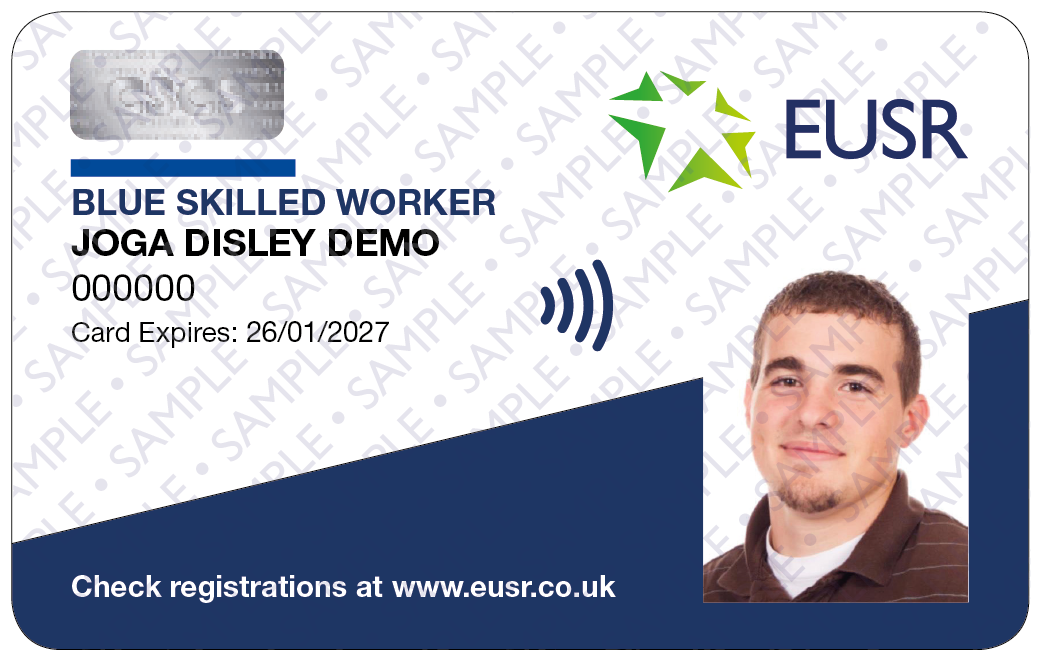
Below are examples of our current EUSR ID Cards.
Please note if you still possess an old-style card with a purple logo, this will remain valid and will be replaced by a current design card when registrations are due for renewal.
If employers have any questions about variations of the EUSR cards, then please ask them to check the EUSR register to verify your card.

EUSR Card
CSCS Partner Card

National Water Hygiene

Scottish Water DOMS
The front of all EUSR ID cards show the first and last name of the cardholder, their EUSR ID Number and their photograph.
The reverse of the card details the current registrations (or endorsements) held by the cardholder. Additional registrations (or endorsements) are displayed solely online and can be viewed on our Register Search.
EUSR Payment Guidelines
If you have any queries about payment methods and guidelines for payments for EUSR, this page can help.
CSCS Partner Card
Our SHEA Schemes all carry the CSCS logo.
Cards carrying this logo allow the cardholder access to construction sites for the purposes of carrying out utilities work.
Full details on CSCS Partnership can be found on the CSCS website.
An EUSR ID card is NOT an identity card and does not entitle a card holder to enter premises.

Frequently Asked Questions
I’ve lost my card, how do I get a replacement card?
All EUSR registrations come with a virtual card as standard, with the option to request a physical plastic card if needed. To access your virtual card, you’ll need a smartphone or tablet and must have your mobile number registered with EUSR.
If you change smartphone or tablet, you can simply re-download the Vircarda app to your new device. However, if your mobile number changes, you’ll need to contact EUSR to update your details before accessing your virtual card again. Virtual and plastic cards can be read by a card reader app which speeds up card checking times and increases security.
You may need to order more than one replacement card. If you hold more than one EUSR registration, you may need to order a separate replacement card for each one. This is because all CSCS affiliated schemes such as SHEA, NCO (Gas & Water), Utilities Network Construction Supervisor are issued on a separate card. Also National Water Hygiene is on a separate card. This applies to both virtual cards and plastic smart cards, so be sure to check which registrations you hold before requesting a replacement.
When ordering a replacement card, you’ll be asked for your EUSR Registration Number. If you don’t know it, use the ‘Register Search’ at the top of this page. Click on ‘Advanced Search’ and you will be able to search using your date of birth and surname instead of the EUSR Registration Number.
We reserve the right to suspend or remove an individual’s EUSR registration where there is evidence of fraudulent activity, such as the use of fraudulent qualification certificates as evidence or, identity theft, whether or not the fraudulent activity was known to have taken place by the individual. We work closely with awarding bodies, CSCS, CITB and the Police where we are aware of such activity and will always take action.
How much does a replacement card cost?
See our Price List for our current fees.
I’ve just got married and changed my name, how do I get the name on my EUSR Card changed?
If you need to update your personal information or change your photograph, you will need to either refresh an existing virtual card, order a new virtual card, or add an optional plastic smart card. To do this, please visit our online shop.
My EUSR registration expires soon, how can I renew it?
Use our scheme search to find the scheme and any relevant renewal details or ask your employer.
How do I find someone who delivers training for the scheme I am interested in taking?
Click here to navigate to our scheme search page.
If you are interested in other schemes and programmes, then you are able to search by industry or enter a keyword into the scheme search. If you can’t find the scheme you are looking for, then please contact EUSR Support (details at the bottom of this page).
How do I view my registration on-line?
The online EUSR register is available 24/7 and can be viewed through our Register Search.
I have a query on my Gas safe registration, who do I speak to?
Unfortunately we cannot help you with any queries relating to your Gas safe registration. You must visit Gas Safe Register or telephone 0800 408 5577.
How long will it take for my card to be sent to me once I have completed the training?
Once your training is completed, the provider or trainer who has delivered the training has to submit your registration application to us. Cards will be delivered back to the provider or trainer typically within 72 hours of us receiving the online registration application. If we have queries on the registration application, then this may take longer.
How can I find out what you use my personal data for?
This privacy notice is for individuals holding an EUSR registration. It outlines what data we need, why, how long we keep it for and what your rights are with regard to your data.
What do I do if I suspect someone is using someone else’s card, or a stolen one?
Call or email us at [email protected] with as much detail as possible. Alternatively, contact the police directly.
I’m not happy with the training I received, who can I tell?
See our Complaints Policy.
I think someone was cheating on my training course, who can I tell?
See our Whistleblowing Policy.
Virtual and Smart Cards FAQ
When will I get a virtual card?
Our virtual and plastic smart cards can still be checked. Load your virtual card to your smartphone or tablet device before attending site (this only needs to be done once). The Checarda app can then be used with or without internet access to check the validity of both the virtual cards and the plastic smart cards.
Why the change to virtual cards - what are the benefits?
The introduction of virtual cards is part of our investment in the future of EUSR. More and more identity and bank cards are now online only. Our planned move to virtual cards was also boosted by a mandate from the Construction Leadership Council (CLC) that all CSCS Partner Card schemes must upgrade to a ‘smart’ solution by 1 April 2022. We launched our new virtual and plastic smart cards on 14 February this year.
CSCS also introduced its Smart Check app on 1 April, which is used at all CSCS-controlled sites to check all CSCS Partner Cards.
We have also been asked by asset and network owners and employers in our sector to stop using plastic cards. Together we are supporting the drive to achieve their Net Zero targets, by helping to reduce the amount of plastic they use.
What is a virtual card?
It’s a digital record of your EUSR registrations. It’s stored in an app called Vircarda on your smartphone (or tablet/iPad) and it works on both Apple and Android systems. When you enter any site that requires you to show your EUSR card, you open the Vircarda app on your phone and your card can be scanned by a contactless card reader – just like your debit card in a shop.
For those who also need an additional physical card, we have also introduced plastic smart cards with a microchip embedded. The microchip stores your EUSR registration record and can be read by the same card readers that read the virtual cards.
Why does EUSR need my mobile number?
Our system needs your mobile number so we can issue you with a virtual card. We will text you with links and instructions on how to access your virtual card.
What if my mobile phone isn’t a Smartphone?
We know that some people have a phone that isn’t smart (it can’t access the internet or download apps). In these instances, you will not be able to access your virtual card and will have to be issued with a plastic smart card.
What if I don’t have a mobile number at all?
We can’t issue you with a virtual card if we don’t have a mobile number for you. Whoever delivers your training will let us know you don’t have a mobile phone and we will work with them to get you issued with a plastic smart card.
Does my mobile number need to be a company mobile?
No, it can be either a company or personal mobile number. It must be unique to you so you can receive the text message with your secure registration and PIN login details.
What if I change my phone – but keep the same number?
For virtual cards, if you get a new mobile, it’s easy to move your virtual card over. On your new mobile, go to your app store, download the wallet app, Vircarda, and then click on the login button in the middle of the registration screen. Enter the email address and password you used when you first registered with Vircarda, click on the ‘Add Card’ button and select the card(s) from the list. When the card has downloaded onto your new phone, the card on the old phone will be cancelled.
What if I change my mobile phone number?
If you change your mobile number, you must update that number in the Vircarda app and you must contact EUSR Support on [email protected] or 0121 745 1310 to update your EUSR ID record as well.
Is Vircarda free of charge?
Yes, Vircarda is a free app.
Can a virtual EUSR card be installed on more than one device at a time?
No. The Vircarda app can be installed on multiple devices, however, your EUSR cards can only be stored on one mobile at a time. This is a security feature designed to ensure your card is not compromised.
I have more than one EUSR ID number – does this cause a problem with virtual cards?
The virtual card app works with only one EUSR ID per person. If you have multiple EUSR IDs, please contact EUSR Support on [email protected] or 0121 745 1310 and we will combine your EUSR ID records.
How are virtual cards checked for validity?
When you’re asked to produce your card on site, you open the Vircarda app on your smartphone or tablet device and show the virtual card. The card checker will validate this using a free app called Checarda (or the CSCS Smart Check app on CSCS sites). Alternatively, your details can still be checked by entering them on the EUSR register search (available 24/7 at www.eusr.co.uk).
Is the virtual card expiry date different to the EUSR registration expiry date?
Yes. A virtual card has an expiry date on the front that is not linked to any of your EUSR registrations. When the virtual card expires, if you still have a ‘live’ EUSR registration you will receive a push notification on your smartphone or tablet which prompts you to add the new card to your virtual wallet.
What if the site I work on has no mobile phone signal?
Yes. A virtual card has an expiry date on the front that is not linked to any of your EUSR registrations. When the virtual card expires, if you still have a ‘live’ EUSR registration you will receive a push notification on your smartphone or tablet which prompts you to add the new card to your virtual wallet.
What does a virtual card cost?
The cost of an EUSR registration has not changed, you simply receive a virtual card instead of a plastic card (see our price list for more details).
If you change your name or want to add a new photo to your EUSR registration record, you can do this using our replacement card service in our online shop available on eusr.co.uk.
What if I accidentally delete the text message that is sent to me with the links to set up my virtual card?
You must contact us so we can reissue the text message. Email [email protected] or call 0121 745 1310.
How do I download the virtual card app?
When your virtual card is ready to download onto to your phone, you will be sent a text message with a registration and PIN number for an app called Vircarda. Go to your usual app store, and download the Vircarda app. Follow the instructions to create an account and then log in. Once you have logged in you will be able to see all of your EUSR registration cards.
Click here for a full guide to Getting Started with the Vircarda app, complete with step-by-step instructions for downloading or watch the video below.
Will plastic smart cards be issued automatically?
No, they will only be issued on request, so when you attend your training course you must make it known to the trainer that you need a plastic smart card.
Can a plastic smart card be requested at any time?
Plastic smart cards can also be requested for existing EUSR registrations using our replacement card process on our online shop. If you’re looking to replace your existing plastic EUSR card with a new plastic smart card you will be charged £2 plus VAT in addition to the standard replacement card fee (see our price list for more details).
What happens to my virtual card when I ask for a new plastic smart card?
When a new plastic smart card is requested (for example if you gain a new registration), then a new virtual card will be issued automatically. The original virtual card (and any original plastic smart card) will be cancelled and will not be readable by the Checarda app. This cancellation will happen 14 days after the issue of the new card(s) to allow time for any new plastic card to reach you.
Will I need to request a new plastic smart card with each new registration?
No, this is optional. The chip embedded in your plastic smart card is automatically updated with your new EUSR registration when it is read by the Checarda app. All registrations held on the chip within a plastic smart card display on the Checarda app, even when it isn’t printed on the plastic smart card. All registrations are also available for checking on the online register.
If you want an updated plastic smart card and you know you will be receiving multiple registrations in a short space of time, you should wait until the final registration is processed to request your new plastic smart card.
Is the plastic smart card expiry date different to the EUSR registration expiry date?
Yes. The chip in a plastic smart card has a lifespan and since it cannot be guaranteed after that time, we’ve added an expiry date to the front of the card. This shows the date the plastic smart card needs to be replaced and does not reflect the expiration date of the EUSR registration(s).
Your EUSR registrations will still be ‘live’ and you can order a new plastic smart card using our replacement card process in our online shop.
What do the new cards mean for CSCS registrations including SHEA, Network Construction Operations (NCO) and Utilities Network Construction Supervisor?
If you use your EUSR card to access a CSCS controlled site, you will need to produce either a virtual card or plastic smart card, both are full compatible with the CSCS Smart Check app.
Why might I need two EUSR cards?
The CSCS Smart Check app can only read EUSR registrations that belong to CSCS Partner Card schemes. For this reason, EUSR must now issue any registrations that can be checked by this app on a separate CSCS card to other EUSR scheme registrations. Depending on your registrations, this may mean you have two EUSR cards instead of one. The first will hold any registrations that are for EUSR’s CSCS Partner Card scheme registrations, the second card will hold those for other EUSR scheme registrations. Both cards are readable by the Checarda app. This will be the same whether the cards are virtual cards or plastic smart cards.
What about renewals?
EUSR registration renewals now automatically come with a virtual card instead of a plastic card. You can request a plastic smart card in addition to the virtual card if you wish, for an additional cost of £2 plus VAT (see our price list for more details).
What about registrations that don’t expire for another year or more?
Your existing plastic card is still valid until the registration expires.
If you use your card to enter a CSCS site, that card must now be checkable by the CSCS Smart Check app. This means you must have a new virtual card or a plastic smart card. Please see our replacement card FAQ for more information.
What happens if my current plastic card is lost or stolen?
If you lose your current plastic card, you can now request a virtual card as a replacement. You also have the option of requesting an additional plastic smart card. Please see our replacement card FAQ for more information.
Contact Us
To find out more, please get in touch by filling out the form below.
Contact Us - EUSR
"*" indicates required fields
